

List your jobs on your own site with the Job Board API
Use the public, read-only Job Board API to fetch your live job posts as JSON and build your own careers page, with Apply links that open the RoundOne application.
The Job Board API returns your live RoundOne job posts as JSON, so your developers can show them on your website in your own design. It needs no API key and no sign-in, and it only reads: it cannot change anything in your workspace. Setting it up takes about five minutes. Building the page is up to your developers.
If you don't need your own design, the Embed snippet on the same page does this for you with two lines of HTML. Use the API when you want full control over how jobs look, or want to feed them into another system.
Before you begin
- At least one job post that is switched on, for an agent that is active. Only those jobs are listed.
- Someone who can add code to your website.
Turn on your careers page
The API serves the same jobs as your careers page, so the careers page must be on first.
Open Careers Page
Click Careers Page in the left sidebar.
Under Your company in the web address, check the name that identifies your company. It appears in every API address (for example acme in /boards/acme/jobs). Change it now if you want to, because changing it later breaks any code that uses the old name.
Switch on the Publish toggle, then click Save in the top right.
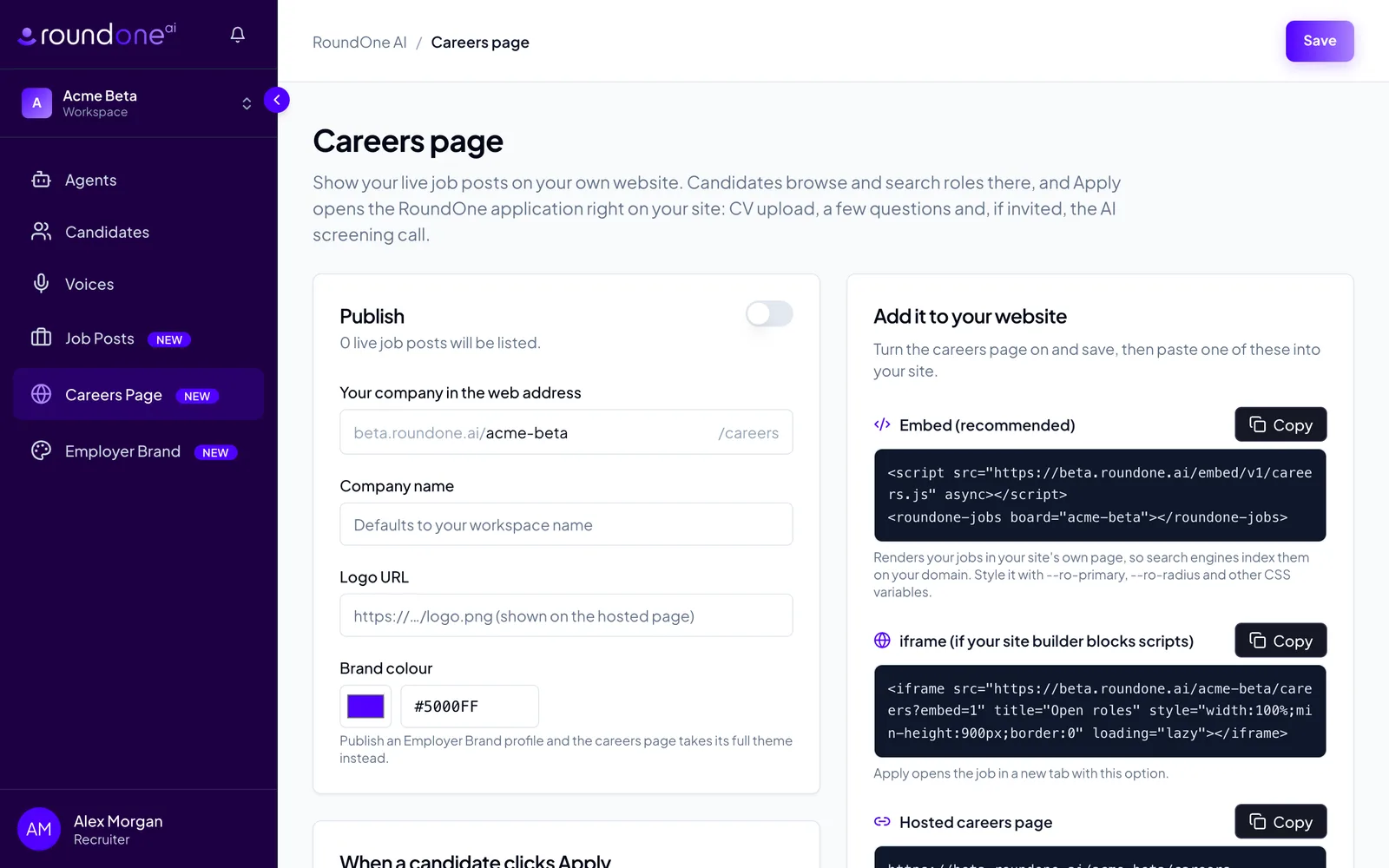
Copy your API address
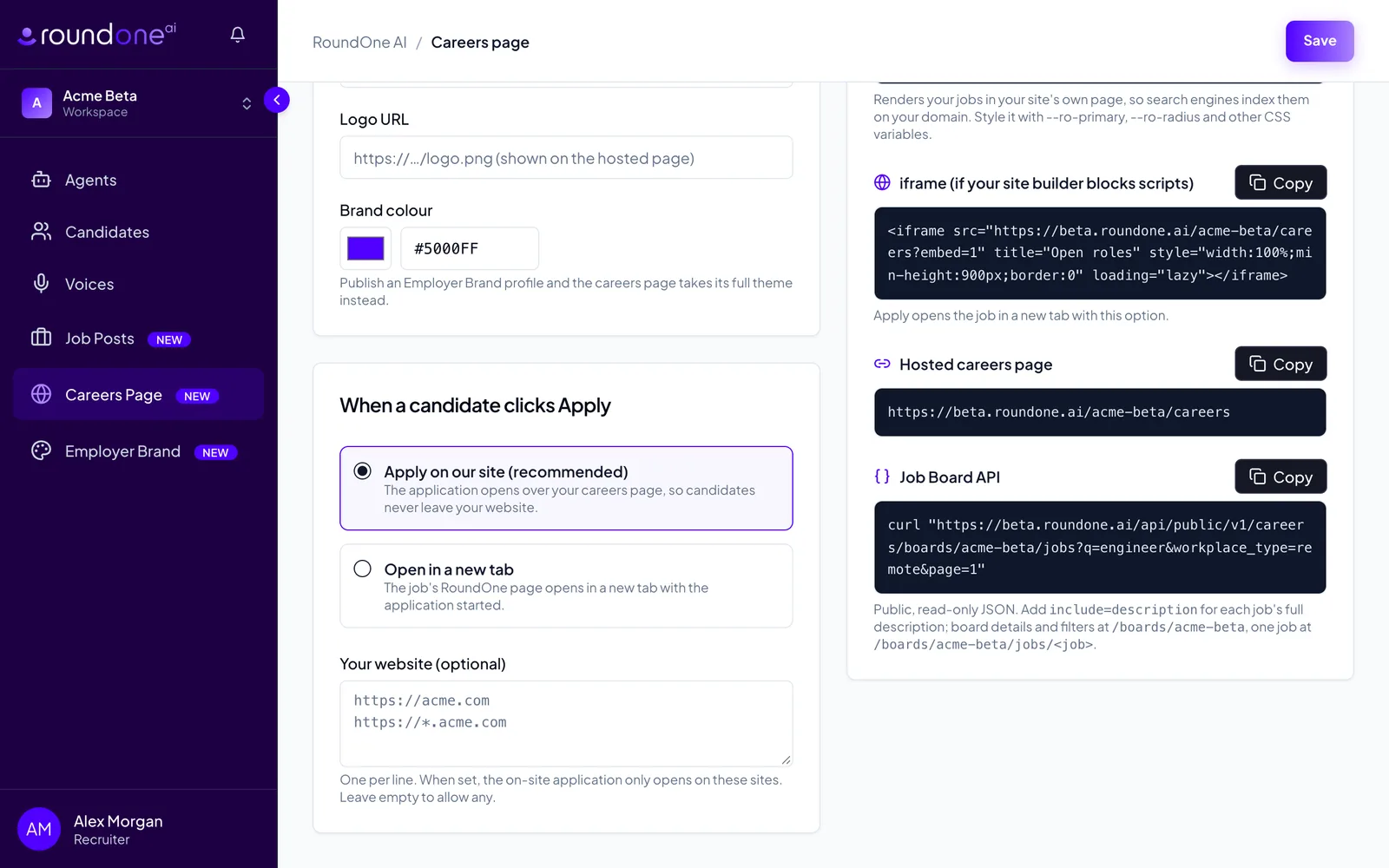
Scroll to Add it to your website. The Job Board API box shows a ready-made request for your company. Click Copy and share it with your developer.
How the API works
Every address starts with:
https://roundone.ai/api/public/v1/careers/boards/<your-company>Replace <your-company> with the name from Your company in the web address. All requests are GET, can be made straight from a web page on any domain, and are cached for about a minute.
Your jobs: /jobs
curl "https://roundone.ai/api/public/v1/careers/boards/acme/jobs"{
"jobs": [{
"slug": "forklift-driver",
"title": "Forklift Driver",
"location": "Manchester",
"workplace_type": "onsite",
"department": "Operations",
"employment_type": "full-time",
"salary": { "min": 28000, "max": 32000, "currency": "GBP", "period": "yearly", "label": "£28,000 – £32,000 /yr" },
"posted_at": "2026-10-02T11:42:07Z",
"url": "https://roundone.ai/acme/careers/forklift-driver",
"apply_url": "https://roundone.ai/acme/careers/forklift-driver"
}],
"page": 1,
"per_page": 20,
"total": 1,
"total_pages": 1
}The newest jobs come first. salary is null unless the job post is set to show it.
You can add these options to the address:
| Option | What it does |
|---|---|
q=engineer | Only jobs whose title, location, department or description contain every word |
location=Manchester | Only jobs with exactly this location (not case-sensitive). department and employment_type work the same way |
workplace_type=remote | onsite, hybrid or remote |
page=2, per_page=50 | Paging. 20 jobs per page by default, at most 50 |
include=description | Adds each job's full description, so you can build the page from one request |
For example, remote engineering jobs with their descriptions:
curl "https://roundone.ai/api/public/v1/careers/boards/acme/jobs?q=engineer&workplace_type=remote&include=description"With include=description, each job also has:
description_markdown: the description as the recruiter wrote itdescription_html: the same text as HTML. All text is escaped, so it is safe to insert into your page as it is.
One job: /jobs/<slug>
curl "https://roundone.ai/api/public/v1/careers/boards/acme/jobs/forklift-driver"This returns one job under job, with everything in the list above plus:
company_nameandcompany_logo_urldescription_markdownanddescription_htmljson_ld: the job in the schema.orgJobPostingformat. Add it to your job page in a<script type="application/ld+json">tag so Google can show the job in its job search.
Your company and filters: the board address
curl "https://roundone.ai/api/public/v1/careers/boards/acme"This returns your company name, logo, brand colours, the number of live jobs and careers_url, the address of your hosted careers page. If you have published an Employer Brand profile, brand carries its company name, tagline and about text; otherwise it is null.
It also returns facets: every location, department, employment type and workplace type in use, each with a job count. Use these to build filter menus.
Sending candidates to apply
Link each job's Apply button to its apply_url. That opens the job's RoundOne page, where the candidate uploads a CV and answers a few questions in a short chat. Applications only come in this way: the API cannot submit them.
Example: a simple jobs list
<ul id="jobs"></ul>
<script>
  fetch('https://roundone.ai/api/public/v1/careers/boards/acme/jobs')
    .then((res) => res.json())
    .then(({ jobs }) => {
      const list = document.getElementById('jobs');
      for (const job of jobs) {
        const item = document.createElement('li');
        const link = document.createElement('a');
        link.href = job.apply_url;
        link.textContent = `${job.title} · ${job.location ?? 'Location to be confirmed'}`;
        item.appendChild(link);
        list.appendChild(item);
      }
    });
</script>
What you see next
Jobs appear in the API within about a minute of being switched on, and drop out within about a minute of being switched off or of their agent being paused. Applications from your site show up in the agent's pipeline like any other applicant. See Read CV scores and take action.
Troubleshooting
Every request returns 404 with {"error":"not_found"}. Check that the careers page is published (the Publish toggle is on and saved) and that the company name in the address matches Your company in the web address exactly. If you have renamed it, update the address in your code.
A job is missing. The job post must be switched on and its agent must be active. A job you have just changed can take up to a minute to appear because responses are cached.
A single job returns 404. The job's slug changed, or the job is no longer live. Fetch /jobs again to get the current list.
No salary is shown. salary is only filled in when the job post is set to show the salary.